Robo-XCopy: an Amiga-style front end for robocopy, written in Rust in two and a half hours
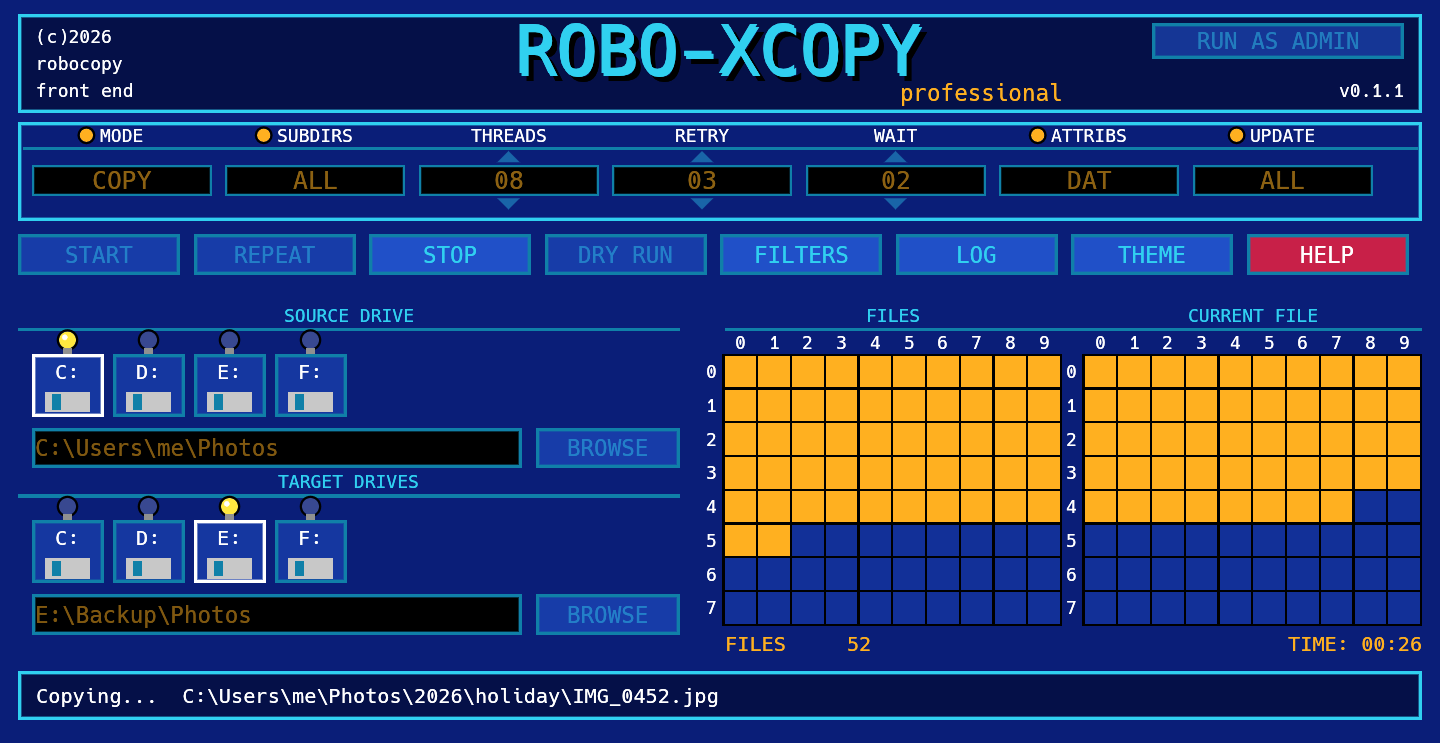
Robocopy is the best copy tool Windows already ships with, and nobody remembers its switches. Yesterday I spent two and a half hours giving it a face: the one from the Amiga's X-Copy.
Robocopy is the copy tool Windows already has built in, and it is the best there is: it copies, mirrors, moves, retries when the network drops, and keeps permissions and dates. The trouble is that nobody remembers its switches. People use it with a page of notes open next to the terminal, and the day they get a /MIR wrong they find out it also deletes what they did not mean to.
Yesterday I built Robo-XCopy: a small graphical front end for robocopy, laid out like the X-Copy screen from the Amiga, the program everyone used to copy floppy disks. It is free, open source, and you can download it from roboxcopy.com.
- What it is and how to use it
- Two themes, because that is how the Amiga looked
- Two and a half hours, and how you get there
- What the real robocopy taught me
- Limits and what’s next
- Try it
What it is and how to use it
A single .exe of about 5 MB, with no installer and nothing to install first. You pick a source and a destination folder, tick the options and press START.
What I wanted from the start:
-
DRY RUN. It shows what robocopy would do (its
/Lswitch) without touching anything. Before a mirror, it is the only button to press. - The command, always visible. Every choice changes the command line the program is about to run, and the same line is printed at the top of the log. Anyone who wants to learn robocopy can learn it by watching.
-
The COPY BUILDER. Every
/COPYand/DCOPYflag with a sentence saying what it does, instead of letters to remember (DATSOU). - Live progress: one file counted at a time on the track grid, like the original.
- The log wherever you want it, and a program that knows when it needs administrator rights and offers to restart itself elevated.
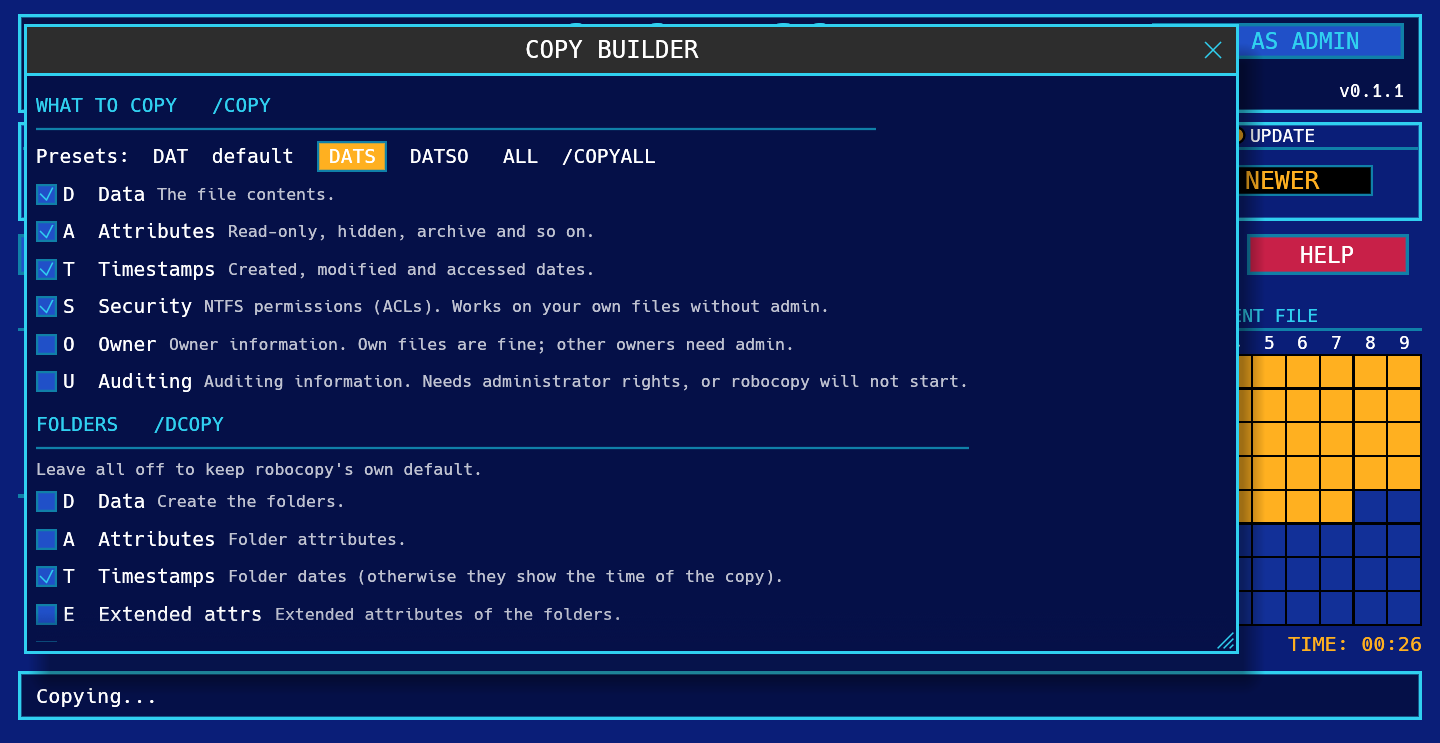
Mirror is the dangerous option: it deletes files in the destination that are not in the source. The program says so plainly, and the advice is always the same: DRY RUN first.
Two themes, because that is how the Amiga looked
The THEME button switches from Modern Amiga (blue) to Classic X-Copy: black, silver and green, with the grid cells filled with zeros like on the screens of old. The choice is remembered between launches.
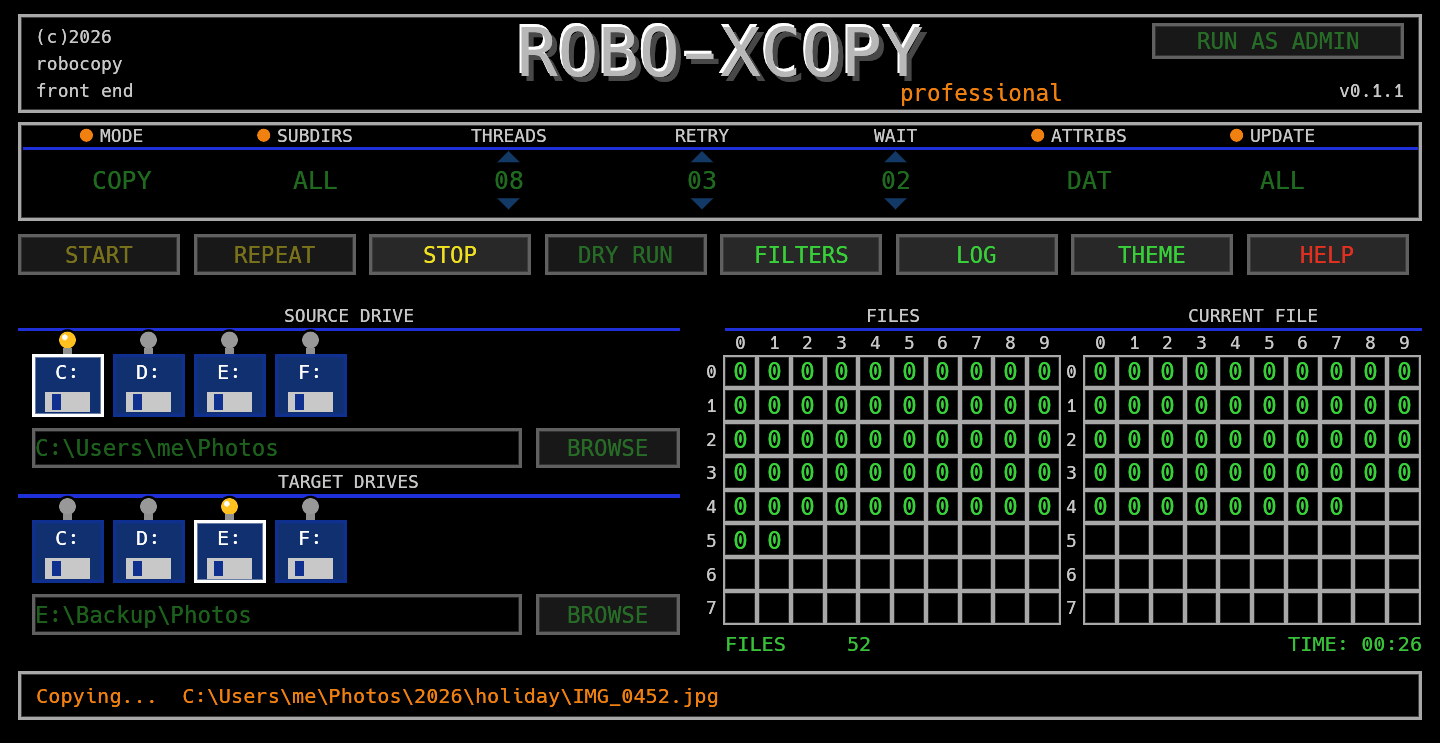
From the original program I took only the idea of the screen. The logo and artwork are something else, and the icon (a floppy disk with an orange X) is drawn pixel by pixel in a text file, from which the program icon, the favicon and the site images are all generated.
Two and a half hours, and how you get there
Claude Code wrote the code, in Rust. The method is the same as my other projects of these months, from this site to DocSteer-EE: I decide what it has to do and how it should look, it writes, and I watch every change run before accepting it. The result is about 2,100 lines of Rust and a test suite that checks its behaviour.
The technical choices, for the curious:
- egui, with widgets drawn by hand on a 640×330 canvas that scales with the window. The buttons, the drive lights and the grids are not Windows controls: they are rectangles and text painted pixel by pixel, which is why the screen looks identical everywhere.
- No extra library to talk to Windows. A handful of calls is enough (open a web address, know whether the program is elevated, restart it as administrator) and they are written directly.
- The program does not reinvent robocopy. It launches it and reads its output. Files are recognised by the shape of the line (tab-separated fields, a numeric size) and not by its text, because robocopy prints in the language of Windows: on an Italian system it says “Nuovo file”. That way it works in any language.
What the real robocopy taught me
My favourite part. There are 20 tests, and many do not simulate robocopy: they run it for real, with every option the builder can produce. Things turned up that no guide says clearly:
-
/IPG(the pause between blocks) together with/MT(multi-thread) makes robocopy exit with error 16 and copy nothing. Now, if you set a pause, the program switches to a single thread. -
/B(backup mode) and theUflag of/COPYALLwithout administrator rights make it refuse to start. The window that offers to restart as administrator is based on this. -
/XOskips a file even when the destination copy has the same date, not just a newer one. - A backslash before the closing quote (
C:\) breaks the arguments, so paths are normalised.
One thing I only found after publishing. Version 0.1.0 imported vcruntime140.dll, meaning it needed the Visual C++ Redistributable, which a fresh Windows install does not have: it started fine on my machine and might not have elsewhere. I found it by listing the DLL names inside the exe. In 0.1.1, out the same evening, the C runtime is linked statically and the exe grows from 4.9 to 5.0 MB. It is the kind of mistake the developer’s own computer never shows.
Limits and what’s next
The program is not code signed yet, so Windows may show the SmartScreen warning on first run (More info, then Run anyway). Every published version comes with a SHA-256 hash and a GitHub build attestation, which lets you verify that the exe is really the one compiled from the repository’s code. Signing is being prepared, and the code signing policy page explains where it stands.
The to-do list includes a real overall progress (with an initial scan to count files and total size), saveable profiles, a notification when a copy finishes, dragging folders onto the window, an Italian and English interface, and an installer. Later, as a separate phase, I would like to evaluate a mode for cloning and wiping disks, with all the protections that calls for.
Try it
The program is at roboxcopy.com, with a step-by-step guide. The code is on GitHub, under the MIT licence.
It was born yesterday and has very few users so far. If you try it and something goes wrong, or there is a robocopy option you miss on the screen, tell me: it is exactly what I need. And you, which command-line tool would you like to see with a friendlier face?