Automated SQL Express database backups

SQL Server Express ships without SQL Agent, so it isn't possible to schedule automated processes — like backups — from within SQL Server itself.
SQL Server Express ships without SQL Agent, so it isn’t possible to schedule automated processes — like backups — from within SQL Server itself. It is however possible to work around this by creating an ad-hoc script that takes care of the various jobs we want to run.
In this article we’ll see how to create a script to back up SQL Express and, right after, one to maintain the backups, whose job will be to always keep the three most recent copies, deleting the older ones as we go.
All the work will happen inside the C:\SQL_Backup folder and its two subfolders scripts and Logs, which need to be created beforehand.
At the end of the article you’ll find all three scripts ready to download, following the same folder structure described above.
- The SQL Express backup script
- Deleting old backups
- The log files
- Running it
- Scheduling
- Update (2026): the modern PowerShell version
- Download
The SQL Express backup script
Let’s go into C:\SQL_Backup\scripts and create a file called backupDB.sql with this content:
DECLARE @dateString CHAR(12), @dayStr CHAR(2), @monthStr CHAR(2), @hourStr CHAR(2), @minStr CHAR(2)
--month variable
IF (SELECT LEN(CAST(MONTH(GETDATE()) AS CHAR(2))))=2
SET @monthSTR=CAST(MONTH(GETDATE()) AS CHAR(2))
ELSE
SET @monthSTR= '0' + CAST(MONTH(GETDATE()) AS CHAR(2))
--day variable
IF (SELECT LEN(CAST(DAY(GETDATE()) AS CHAR(2))))=2
SET @daySTR=CAST(DAY(GETDATE()) AS CHAR(2))
ELSE
SET @daySTR='0' + CAST(DAY(GETDATE()) AS CHAR(2))
--hour variable
IF (SELECT LEN(DATEPART(hh, GETDATE())))=2
SET @hourStr=CAST(DATEPART(hh, GETDATE()) AS CHAR(2))
ELSE
SET @hourStr= '0' + CAST(DATEPART(hh, GETDATE()) AS CHAR(2))
--minute variable
IF (SELECT LEN(DATEPART(mi, GETDATE())))=2
SET @minStr=CAST(DATEPART(mi, GETDATE()) AS CHAR(2))
ELSE
SET @minStr= '0' + CAST(DATEPART(mi, GETDATE()) AS CHAR(2))
--name variable based on time stamp
SET @dateString=CAST(YEAR(GETDATE()) AS CHAR(4)) + @monthStr + @dayStr + @hourStr + @minStr
--=================================================================
DECLARE @IDENT INT, @sql VARCHAR(1000), @DBNAME VARCHAR(200)
SELECT @IDENT=MIN(database_id) FROM SYS.DATABASES WHERE [database_id] > 0 AND NAME NOT IN ('TEMPDB')
WHILE @IDENT IS NOT NULL
BEGIN
SELECT @DBNAME = NAME FROM SYS.DATABASES WHERE database_id = @IDENT
/*Change disk location here as required*/
SELECT @SQL = 'BACKUP DATABASE '+@DBNAME+' TO DISK = ''C:\SQL_Backup\'+@DBNAME+'_db_' + @dateString +'.BAK'' WITH INIT'
EXEC (@SQL)
SELECT @IDENT=MIN(database_id) FROM SYS.DATABASES WHERE [database_id] > 0 AND database_id>@IDENT AND NAME NOT IN ('TEMPDB')
END
The script will create one backup for each database inside SQL Express, appending a kind of “timestamp” to the end of the name to identify them over time, before finishing with the .BAK extension.
Deleting old backups
Still inside C:\SQL_Backup\scripts, let’s create a file deleteoldsqlbaks.vbs containing:
On Error Resume Next
Dim fso, folder, files, sFolder, sFolderTarget
Set fso = CreateObject("Scripting.FileSystemObject")

'location of the database backup files
sFolder = "C:\SQL_Backup\"

Set folder = fso.GetFolder(sFolder)
Set files = folder.Files

'used for writing to textfile - generate report on database backups deleted
Const ForAppending = 8

'you need to create a folder named "scripts" for ease of file management &
'a file inside it named "LOG.txt" for delete activity logging
Set objFile = fso.OpenTextFile(sFolder & "\Logs\cleanuplog.txt", ForAppending)

objFile.Write "================================================================" & VBCRLF & VBCRLF
objFile.Write " DATABASE BACKUP FILE REPORT " & VBCRLF
objFile.Write " DATE: " & FormatDateTime(Now(),1) & "" & VBCRLF
objFile.Write " TIME: " & FormatDateTime(Now(),3) & "" & VBCRLF & VBCRLF
objFile.Write "================================================================" & VBCRLF

'iterate thru each of the files in the database backup folder
For Each itemFiles In files
'retrieve complete path of file for the DeleteFile method and to extract
'file extension using the GetExtensionName method
a=sFolder & itemFiles.Name

'retrieve file extension
b = fso.GetExtensionName(a)
'check if the file extension is BAK
If uCase(b)="BAK" Then

'check if the database backups are older than 3 days
If DateDiff("d",itemFiles.DateCreated,Now()) >= 3 Then

'Delete any old BACKUP files to cleanup folder
fso.DeleteFile a
objFile.WriteLine "BACKUP FILE DELETED: " & a
End If
End If
Next

objFile.WriteLine "================================================================" & VBCRLF & VBCRLF

objFile.Close

Set objFile = Nothing
Set fso = Nothing
Set folder = Nothing
Set files = Nothing
This script’s job is to go into the folder where we’ve saved the backups, “count” the backups present, and keep the three most recent, deleting the rest. It also writes a log of the operations it performs.
The log files
Let’s go into C:\SQL_Backup\Logs and create two empty files, which we’ll call backuplog.txt and cleanuplog.txt
Running it
Let’s create the databasebackup.cmd file
@echo off
REM Run the backup and write the log
sqlcmd -S SERVER\SQLEXPRESS -E -i C:\SQL_Backup\scripts\backupDB.sql -o C:\SQL_Backup\Logs\backuplog.txt

REM Run the cleanup script and update cleanuplog.txt
C:\SQL_Backup\scripts\deleteoldsqlbaks.vbs
The only change needed is entering your server’s name and instance, replacing SERVER\SQLEXPRESS with your own values (presumably the instance is always called SQLEXPRESS, but the server name changes)
Scheduling
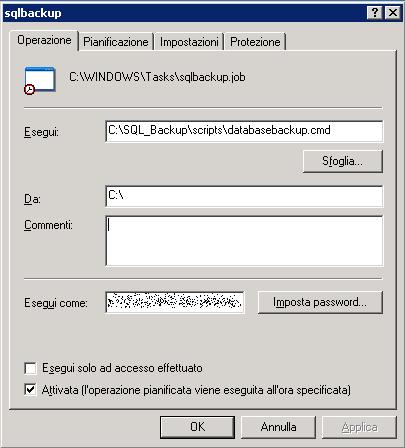
All that’s left is to create a Scheduled Task from the Windows Control Panel, whose only job will be to run C:\SQL_Backup\scripts\databasebackup.cmd, setting a time and recurrence to fit your needs.
Update (2026): the modern PowerShell version
14 years on, the underlying approach (an external script plus a scheduled task, since SQL Express never gained SQL Agent) still holds up, and the backupDB.sql script still works exactly as it is. What’s aged is the rest of the chain: Microsoft has started deprecating VBScript, with planned removal from Windows in upcoming versions, so it no longer makes sense to write new code that depends on it.
Instead of deleteoldsqlbaks.vbs and databasebackup.cmd, a single PowerShell script is enough — it calls backupDB.sql via sqlcmd (no extra dependency to install) and handles cleanup by keeping only the most recent copies per database, instead of the original script’s simple “delete anything older than 3 days”:
# backup.ps1 - modern version, replaces deleteoldsqlbaks.vbs + databasebackup.cmd
# Only requires sqlcmd (included with SQL Server / SQL Server Express, or
# installable separately via the "SQL Server Command Line Utilities")

$SqlInstance = "SERVER\SQLEXPRESS"
$BackupPath  = "C:\SQL_Backup"
$KeepCopies  = 3

# 1. Backup: calls the T-SQL script backupDB.sql, unchanged
sqlcmd -S $SqlInstance -E -i "$BackupPath\scripts\backupDB.sql" -o "$BackupPath\Logs\backuplog.txt"

# 2. Cleanup: keeps only the latest $KeepCopies copies per database
Get-ChildItem -Path $BackupPath -Filter "*.BAK" |
    Group-Object { $_.Name -replace '_db_\d{12}\.BAK$', '' } |
    ForEach-Object {
        $_.Group | Sort-Object LastWriteTime -Descending | Select-Object -Skip $KeepCopies
    } |
    ForEach-Object {
        Remove-Item $_.FullName -Force
        "$(Get-Date -Format s)  BACKUP FILE DELETED: $($_.FullName)" | Add-Content "$BackupPath\Logs\cleanuplog.txt"
    }
In the Scheduled Task, the action to run becomes powershell.exe -ExecutionPolicy Bypass -File C:\SQL_Backup\scripts\backup.ps1 instead of the old databasebackup.cmd.
Download
- backupDB.sql
- backup.ps1 — recommended version (2026)
- deleteoldsqlbaks.vbs — original 2012 script
- databasebackup.cmd — original 2012 script
| Via | mssqltips.com |